Category: Startup Lab

  • Build Log 004: Web Evidence Inspector

    Startup Lab · Build 004 · Technical build case study

    Build Log 004: Web Evidence Inspector

    Building a bounded browser evidence tool for one controlled public page load.

    Many website checks compress a browser session into a score, then leave the reader to guess what that score actually saw. The Web Evidence Inspector takes a narrower route. It runs one controlled visit to one public HTTP or HTTPS URL, keeps the observed layers distinguishable, and presents a limited public result rather than a verdict about a whole website.

    This is not a complete security scan. It reflects one controlled page load only.


    What the Web Evidence Inspector is

    The Inspector is a bounded browser-evidence tool. A person supplies one public URL. A controlled Chromium session loads that page once. The system records a defined set of observations, produces findings from those observations, and returns a deliberately reduced public summary.

    • It accepts one public HTTP or HTTPS URL within its input policy.
    • It performs one controlled browser page load, rather than a site-wide crawl.
    • It turns recorded observations into explainable inspection findings.
    • It exposes a sanitised public result while keeping raw evidence private.

    That boundary is the point. The project is not trying to make a browser visit sound more conclusive than it is. It is trying to preserve useful evidence from a specific, repeatable moment without pretending that one moment describes every route, user state, device, consent choice, or future version of a site.

    Why I built it

    Startup Lab is where Darja Rihla tests whether a useful idea can survive contact with real technical constraints. Here, the engineering question was not “How do we produce a bigger score?” It was: can one browser visit create a small record that a person can inspect, explain and keep in proportion?

    The resulting design favours understandable output, strict boundaries and reproducible behaviour. An observation can be useful without becoming an accusation. A missing header, a failed request or a third-party domain may deserve review; none of those observations alone proves that a website is secure, insecure, compliant or non-compliant.

    What one controlled visit can observe

    For the bounded page load, the implementation can record the request sequence and redirects, first-party and third-party domains, main-document security-header observations, tracker-rule matches, cookie metadata, browser-storage indicators, console observations and failed requests. It can then present public counts, categories and finding labels derived from that run.

    The distinction between observation and interpretation is kept deliberately visible. A public result states that something was observed during this bounded inspection. It does not publish the private evidence bundle, and it does not turn an absence of observation into proof that the underlying behaviour does not exist.

    What the public result does not expose

    The public result is designed to omit raw evidence and sensitive details. The implementation uses a separate public-result schema and stores raw evidence and assessment artifacts privately for a limited period. Public URLs are sanitised before they are returned.

    The boundary around the browser

    The local Build 004 candidate separates the public entry point, the Inspector and outbound network access:

    Public request → ingress gateway → Inspector → controlled egress proxy → public internet

    The Inspector does not own a direct public-internet route or a direct LAN route. The ingress gateway is the entry point. The Inspector requires its browser traffic to use the egress proxy; without that proxy, the interactive runner fails closed.

    The input and egress layers reject local and private destinations. At the egress boundary, DNS A and AAAA results are validated and non-global destinations are rejected before the proxy connects to the approved address. This is designed to keep a public URL field from becoming a route into local services or private networks. Redirects and subresources travel through that same controlled egress boundary rather than receiving a separate unrestricted path.

    The local container candidate also runs the Inspector as a non-root user, leaves Chromium’s sandbox enabled, avoids privileged mode and host networking, and configures a project-scoped seccomp profile for the Inspector service. These are engineering controls, not a claim that the tool eliminates all risk.

    Public output, private evidence

    A useful public interface should not quietly become an evidence leak. Build 004 assigns opaque run IDs, limits the queue, applies rate limiting and gives runs an expiry time. The browser-facing API returns a sanitised result; raw evidence and assessment artifacts are not public API routes.

    That separation gives the public result an appropriate role: it is a compact record of what the bounded inspection observed. Any deeper interpretation still needs the right context and, where appropriate, human review.

    A harmless example, not a scorecard

    The validated local candidate successfully completed an inspection of https://example.com through the ingress gateway and controlled egress proxy. That run is useful as a harmless proof of the local workflow. It is not presented here as a security assessment of example.com, and this article does not invent a set of metrics from it.

    In a public result, a reader can expect a limited summary such as observed request counts, domain categories, header states, redirect steps, storage or cookie counts, console and failed-request counts, and bounded finding labels. The exact values belong to the specific run, not to this article.

    Limits that stay visible

    • It observes one controlled page load, not a complete crawl of a website.
    • It is not a full vulnerability scan or a penetration test.
    • Its observations are evidence from a defined session, not absolute proof about a website.
    • Dynamic behaviour can differ between sessions, devices, regions, consent states and user interactions.
    • The absence of an observation is not necessarily the absence of the underlying behaviour.

    The tool does not log in, submit forms or explore a site as a human user might. A review that needs those things needs a different scope and a different method.

    What was validated locally

    The Build 004 implementation handoff records a validated local candidate, not a public deployment. Its test suite was rerun with 74 passing tests and 0 failures. The local browser workflow was exercised successfully, the isolated service topology was checked, and the public-result boundary was mechanically checked for safe fields and the absence of raw private markers.

    The same local acceptance record reports that an https://example.com inspection succeeded through the ingress gateway and egress proxy. It also records the limits of that validation: controlled public-origin browser integrations for a redirect to a private destination and a private-IP subresource had not been run. Keeping that distinction in the record is part of the project’s evidence-first discipline.

    An evidence-first iteration

    Build 004 is an engineering project in motion. The useful outcome is not a grand claim about automation; it is a narrower, inspectable path from one controlled browser visit to an explainable record. The next question is not whether to blur that boundary. It is whether the bounded result helps a real person ask better questions, while keeping the limits intact.

    Return to Startup Lab

  • Build 003: Web Evidence Inspector

    Startup Lab Build 003

    Build Log 003: Darja Rihla Web Evidence Inspector

    A local, evidence-first workflow for turning one controlled website visit into technical observations, traceable findings and reviewable reporting.

    Product status
    Functional MVP
    Commercial validation
    Unproven
    Scope
    One controlled page load
    Conceptual illustration of a website being transformed into structured technical evidence
    A conceptual editorial illustration of the evidence-first idea, not a screenshot of the Inspector.

    This record describes retained technical runs from 13 September 2026. It is not a current assessment of any website, a security verdict or a claim of commercial readiness.

    Seeing a website is not the same as retaining evidence of what a browser observed.

    A visual inspection can suggest where to look, but it does not automatically preserve the request sequence, redirects, browser storage metadata, console observations or the rule that led to a finding. The Web Evidence Inspector was built to keep those layers distinguishable.

    The intended boundary is deliberately narrow: one public target URL, one controlled browser visit, a limited set of observations and a human reviewer who decides what the result means.

    Can a bounded browser workflow produce a traceable record without turning an observation into a verdict?

    The project tests whether one controlled page load can collect privacy-minimised technical observations, derive deterministic findings and produce separate consultant and client-facing outputs. It does not test a general security scan, legal compliance, or a hosted monitoring service.

    One visit, separated layers of evidence and interpretation.

    The workflow opens a target website in a controlled Chromium session and records a bounded observation set: requests, redirects, first-party and third-party domains, main-document response headers, tracker-rule matches, tracker transmissions where observed, browser storage-key metadata, cookie metadata, console messages and failed requests.

    1. Target websiteOne public target URL within the defined scope.
    2. Controlled captureOne bounded Chromium visit.
    3. Structured evidenceevidence.json
    4. Findingsfindings.json
    5. Consultant reportreport.md
    6. Client outputclient-summary.html and client-summary.pdf
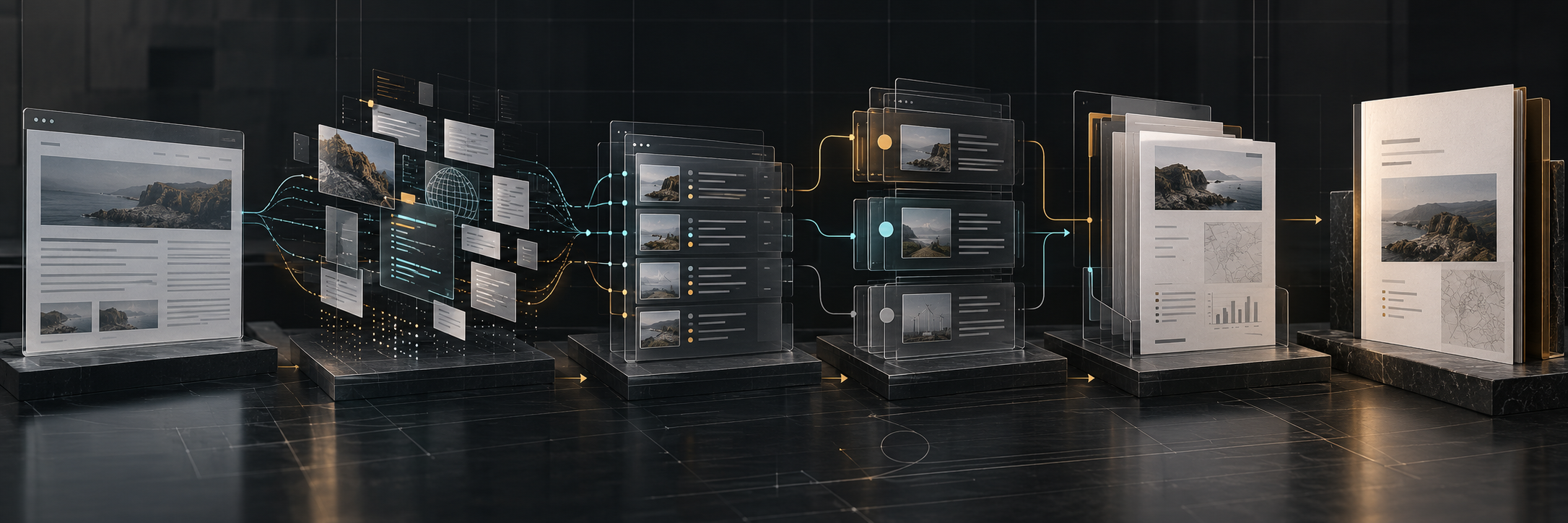
    The visual diagram mirrors this accessible, verified sequence in each retained bundle. Raw observations, deterministic findings and human interpretation remain separate.
    Conceptual illustration of the Web Evidence Inspector pipeline from website capture to client report
    This conceptual illustration supplements the verified semantic pipeline above; it does not replace it.
    Privacy boundary

    The capture design excludes request and response bodies, credential-header values, cookie values, storage values, query-parameter values, page content and form input. URLs are retained without query values; storage and cookie entries retain metadata rather than values.

    Five retained outputs per run.

    01

    evidence.json

    Raw, redacted technical observations from the browser session.

    02

    findings.json

    Deterministic rule results with evidence references.

    03

    report.md

    A consultant-facing Markdown report that keeps observed facts and next checks visible.

    04

    Client HTML

    A readable summary derived from the same evidence set.

    05

    Client PDF

    A portable version of that client summary.

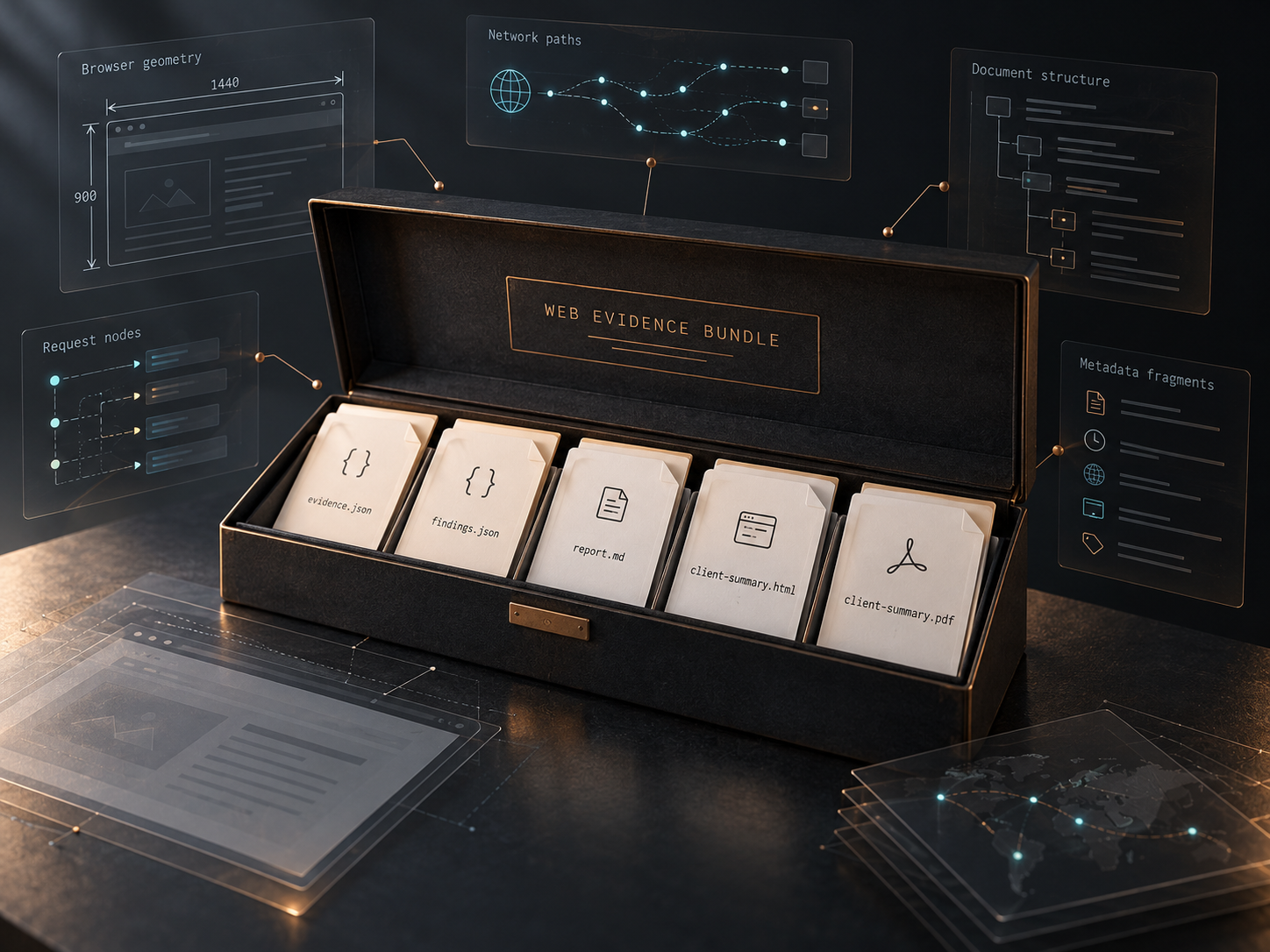
    Conceptual visualization of the five artifacts produced in a Web Evidence Inspector evidence bundle
    A conceptual visualization of bundle anatomy, not literal screenshots of retained reports.

    Technical evidence and commercial validation are different questions.

    What the retained record supports

    • Six retained bundles contain the same five output types.
    • During the September recovery review, a local consistency check found every machine-style request or console reference in the retained findings in its matching evidence.json.
    • Two isolated, non-browser-dependent current-source test files passed during the recovery check in a temporary environment: tracker transmission and console-origin classification.

    What it does not establish

    • A fresh full browser-dependent test-suite pass.
    • Current findings about any website.
    • Customer adoption, revenue, willingness to pay or market demand.

    Six bounded historical runs with a consistent output structure.

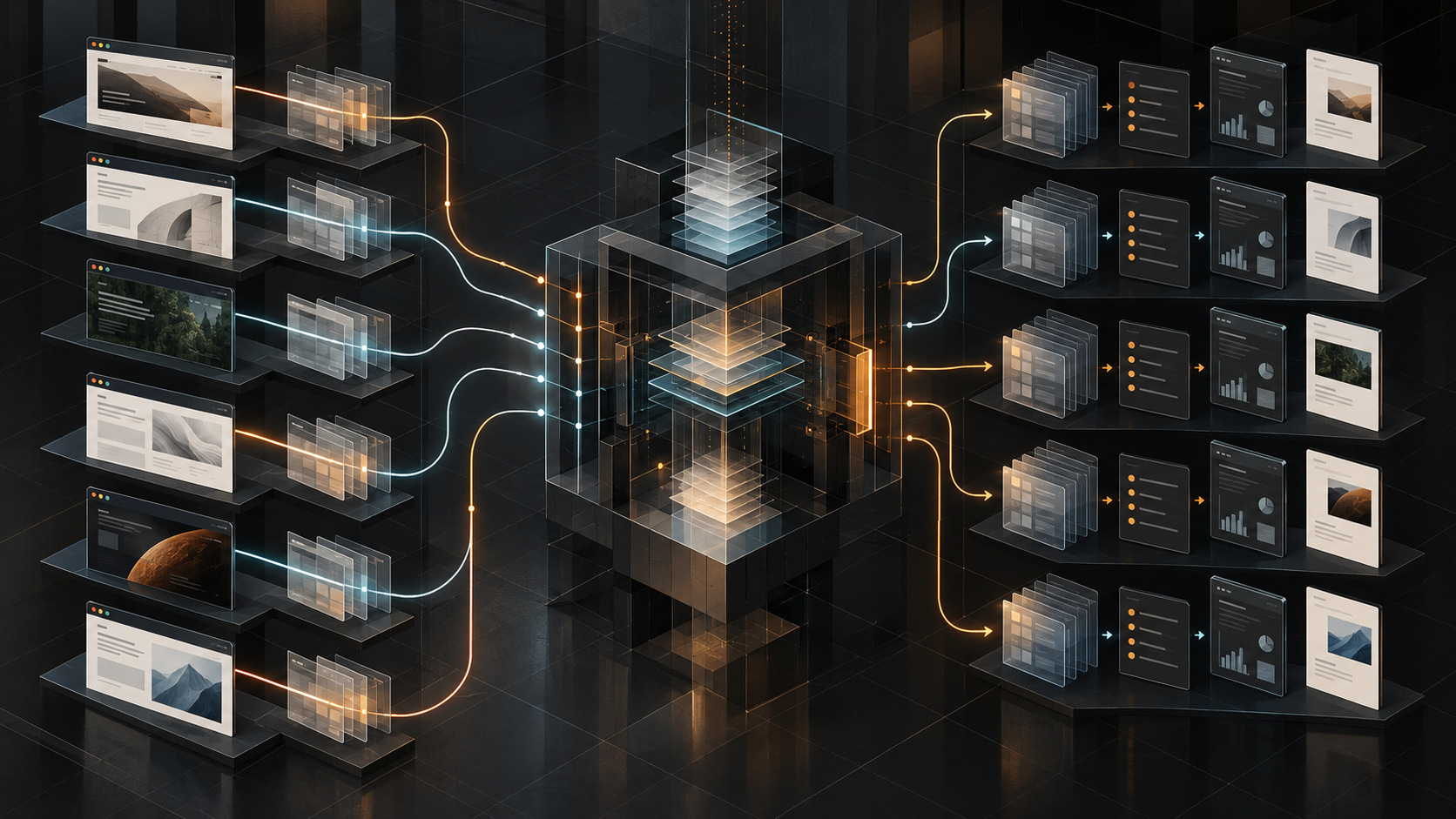
    The retained record contains four internal technical runs and two external public-site runs, all made on 13 September 2026. They are historical snapshots of controlled sessions, not live claims about any website.

    Conceptual visualization of six historical technical runs using the same repeatable evidence process
    A conceptual visualization of historical repeatability; it does not indicate live monitoring, current status or commercial adoption.
    Run typeContextOutput bundleEvidence producedHistorical date
    Internal technical runs4 controlled visits to the Darja Rihla public website.Five retained files per run.Bounded browser observations, findings and review outputs.13 September 2026
    External technical runs2 controlled visits to independent public websites.Five retained files per run.Bounded browser observations, findings and review outputs.13 September 2026

    A REVIEW result means that a check requires human attention within the performed scope. It is not proof that a website is insecure, non-compliant or unsafe.

    The useful unit is a chain a human can inspect.

    The retained bundles demonstrate a complete artifact chain from browser observation to a deterministic finding, consultant report and client-facing summary. This makes it possible to distinguish a tracker rule match from a tracker transmission, and a missing header observation from a conclusion about overall security.

    That separation matters. A tool can preserve the evidence and state the boundary. A consultant still decides whether an observation is relevant, contextual or actionable.

    Bounded by design.

    • Each run is one page load, one URL, one viewport and one user agent.
    • The retained sessions did not log in, navigate, submit forms or interact with a consent banner.
    • Tracker detection is limited to the bundled rule set; headers are observed on the main document response.
    • No public dashboard, account system, continuous monitoring, screenshot artifact or client self-service product was found in the retained project evidence.
    • The full browser-dependent suite was not freshly reproduced in this recovery environment.

    Current classification

    Functional MVP

    The bounded end-to-end workflow exists, and retained output bundles demonstrate its stages. Commercial validation remains unproven: no evidence of paid clients, revenue, adoption, market demand or independently validated customer outcomes was located.

    Conceptual illustration of a functional technical system with commercial validation still ahead
    A conceptual editorial illustration of technical progress with the commercial question still unresolved.

    Artifacts exist. They are not decorative proof.

    This page does not embed raw reports, screenshots or a simulated dashboard. The relevant artifacts are retained locally as a review record because they include target-specific technical observations. Before any public excerpt or image is used, it needs a human privacy, context and permissions review.

    Retained output record

    Each of the six bundles contains evidence.json, findings.json, report.md, client-summary.html and client-summary.pdf. The candidate page represents their structure and verified aggregate facts, rather than republishing their raw contents.

    Observation, finding and judgement need different owners.

    Generic website scores hide the relationship between evidence and conclusion. A more useful pattern preserves what a browser observed, makes rule logic traceable and leaves the final judgement with a person who understands the client context.

    It also made a product boundary visible: historical technical evidence shows that a workflow can produce artifacts. It does not show that a market wants the workflow, will pay for it or can use it without guided interpretation.

    Improve the technical record, then test usefulness in the real world.

    Technical

    Restore a clean, reproducible full test run and track source and generated-bundle provenance in version control.

    UX

    Test whether a reviewer can move from evidence to a useful, bounded explanation without confusing observation and judgement.

    Automation

    Improve repeatability without expanding the bounded scan into autonomous or continuous monitoring.

    Commercial validation

    Run a clearly consented external trial that measures usefulness and willingness to pay separately from technical output.

    Return to Startup Lab

  • Build Log 002

    Build Log 002 · 7 September 2026

    Turning Linux Basics Into an Interactive Learning System

    How Darja Rihla redesigned a beginner Linux course around simulation, guided onboarding, multilingual UX and release discipline

    ArtifactDarja Rihla Linux Basics
    Product URLLIVE · Browser-based
    LanguagesEN · NL · FR
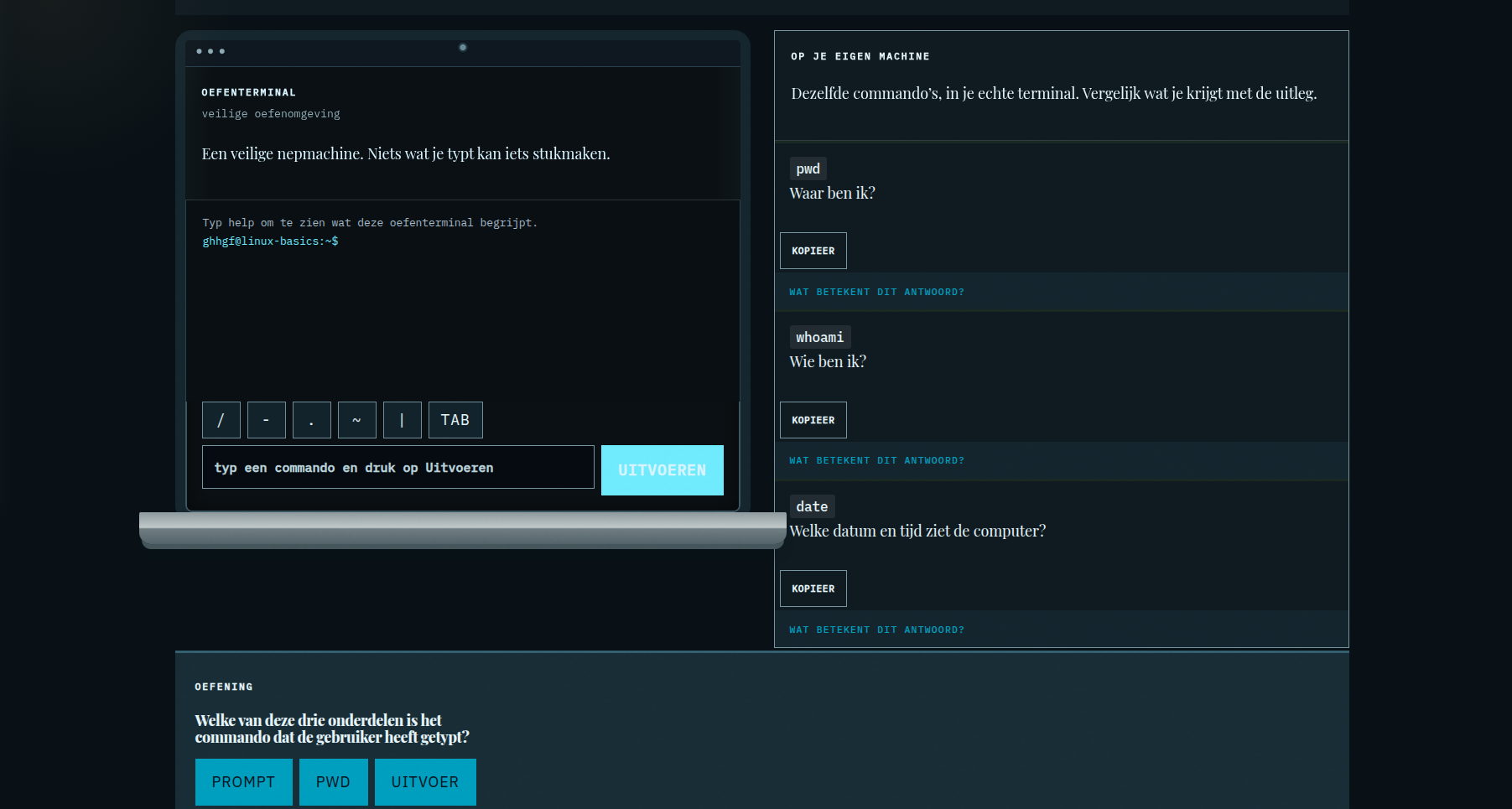
    Darja Rihla Linux Basics live interface showing the interactive practice terminal inside the final laptop-style presentation
    Live Linux Basics interface showing the interactive practice terminal inside the final laptop-style presentation.

    01 · The starting point

    A small public route became a product decision.

    Linux Basics began as a free learning route inside Darja Rihla. The build was not treated as a static article: it had a browser interface, lesson data, a simulated terminal, language switching and saved progress. The public product URL is darjarihla.com/linux-basics/.

    Artifact 002 records the route as an interactive learning system and preserves the decisions that made it safe enough for beginners to use.

    02 · The beginner problem

    The first version started too close to security.

    The old free Linux Basics route was too security-heavy for true beginners. Security is a legitimate destination, but it is a poor first step when a learner still needs to recognise a prompt, type a command, read output and understand where they are.

    The revision therefore moved fundamentals first: terminal reading, paths, files and basic command behaviour. Security context remains present, but it no longer has to carry the opening lessons.

    03 · Redesigning the curriculum

    Begin with orientation, then add capability.

    The revised beginner sequence makes the first actions legible. Lessons explain what the learner sees before asking them to reason about risk. Exercises are part of the lesson flow, while the lesson packs remain separate from the interface renderer.

    Beginner-first rule

    Every early interaction should answer a simple question: what is on screen, what did I type, and what did the simulated computer return?

    04 · The safe terminal decision

    Simulation made practice possible without system consequences.

    The browser terminal is a local simulation. It is not a shell connected to the visitor’s operating system, and it does not execute real system changes. Commands are interpreted by the Linux simulator used by the page and the resulting output is rendered in the browser.

    This boundary is explained as part of the interface because “safe” is a product property that has to be visible, not an assumption hidden in source code.

    05 · Separating content, simulation and presentation

    Three responsibilities stay distinguishable.

    The simulator handles command behaviour. The lesson packs hold instructional content. The presentation layer renders the terminal, lessons, controls, progress, completion state and guided tour. Keeping these responsibilities apart makes a content revision different from a simulator change, and a visual refinement different from a curriculum rewrite.

    The repository contains separate files for the simulator, EN/NL/FR lesson packs and the Linux Basics presentation assets. This article documents that separation without presenting it as a larger framework than the code supports.

    06 · Guided onboarding

    Help appears where the learner needs it.

    The first-run guided tour uses six contextual targets: the full practice terminal, terminal output, the input field, helper buttons, the Run button and the lesson rail. The tour can be restarted, can be dismissed permanently with Skip or Done, and closes for the current page session with Escape.

    The contextual popover and focus handling keep the explanation connected to the interface instead of placing the learner in a separate generic introduction screen.

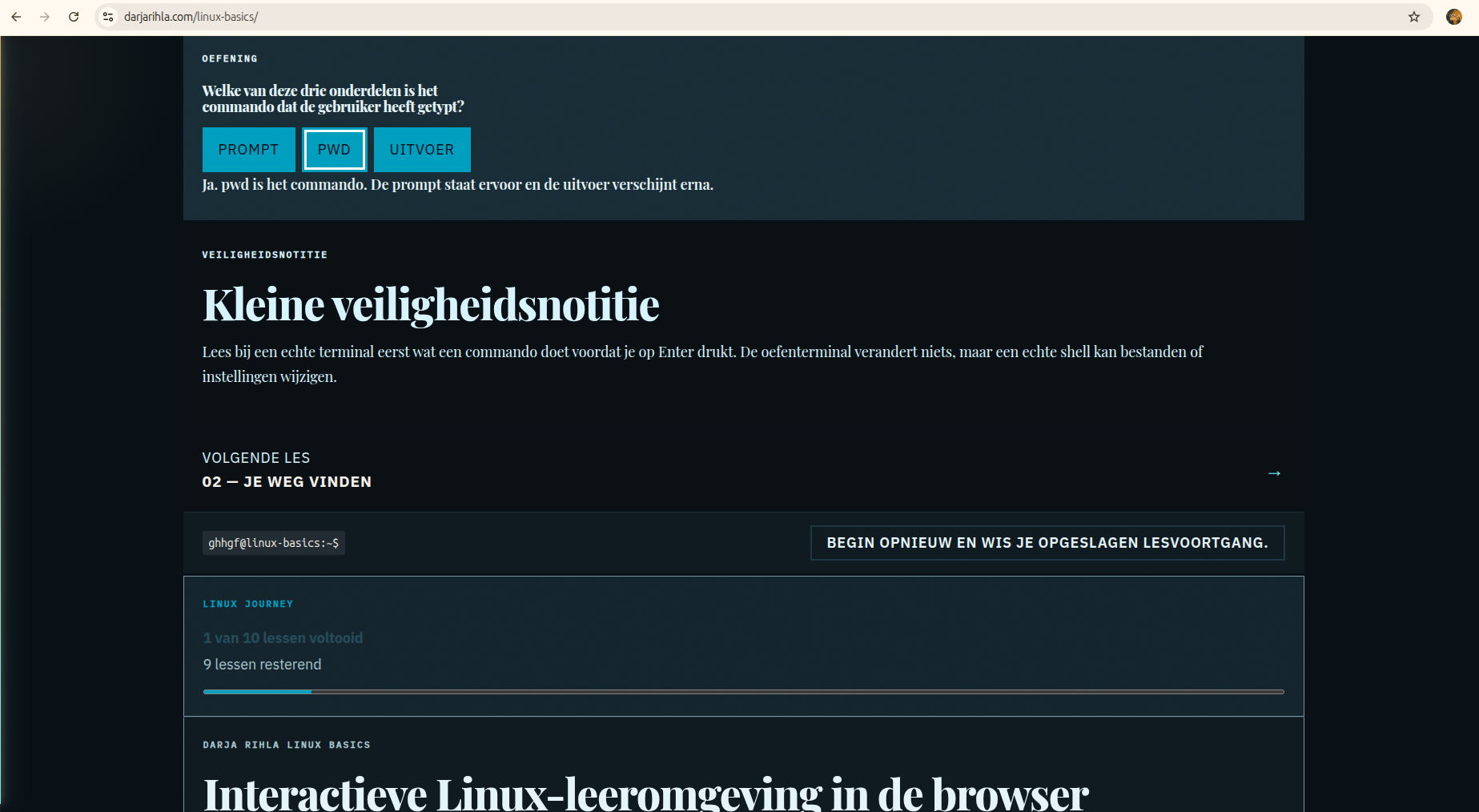
    Darja Rihla Linux Basics live interface showing lesson completion feedback and local journey progress
    Live Linux Basics interface showing lesson controls, completion feedback and local journey progress in the browser-based learning environment.

    07 · EN / NL / FR architecture

    Language is content, not a cosmetic switch.

    English, Dutch and French are separate lesson packs. The application uses the active language to render lesson content, interface guidance and terminal-frame text. This keeps translation work visible and keeps the learning material from being reduced to a few translated labels.

    ENEnglish lesson pack and interface copy
    NLDutch beginner revision for lessons 1 and 2
    FRFrench lesson pack and interface copy

    08 · Touch, keyboard and accessibility

    The interaction model has to survive outside a desktop mouse.

    Controls use real buttons and links, visible focus styles and touch-sized targets. The guided tour supports keyboard focus, Tab and Shift+Tab containment, Escape closing and focus restoration. Reduced-motion rules remain part of the CSS. On narrow screens the laptop presentation simplifies to a usable terminal card rather than forcing hardware decoration into the interaction area.

    These are implementation properties recorded in the source, not a claim that every accessibility outcome has been independently audited by a specialist.

    09 · Progress and completion

    Progress is useful when it has one source of truth.

    The interface derives completed lessons from the existing answers object and stores that state in browser localStorage. The progress component shows completed and remaining lessons. The completion card appears only when all ten lesson answers are correct and links to the existing Linux Basics, Advanced Linux and Cybersecurity routes.

    There is no certificate claim and no fake badge. Completion means the local learning path has reached its defined end state in that browser.

    10 · From terminal card to laptop screen

    The shell changed the reading of the product.

    The terminal remained real HTML and remained interactive. A CSS-only laptop shell was layered around it: bezel, screen edge, webcam indication, depth and a base below the screen. On mobile the base is hidden and the terminal remains usable. The visual change clarifies the product without replacing it with a screenshot.

    11 · Removing inline CSS and JavaScript

    Preview structure stays separate from behaviour and presentation.

    The Linux Basics preview loads external CSS and JavaScript assets. The preview contains no inline style block, no style attributes and no inline script. This keeps the authoring source inspectable and allows the live child-theme assets to remain the actual implementation.

    12 · Release and rollback discipline

    A small interface still needs a release boundary.

    Release preparation included targeted status checks, syntax checks with Node and whitespace validation with git diff check. The repository also contains the baseline directory Pages/linux-basics/evidence/before-beginner-revision/ with baseline Linux Basics CSS, JavaScript, simulator and lesson-pack files for rollback reference.

    The preview is evidence of local assembly, not automatic publication. WordPress publication remains a separate human-controlled action.

    13 · What this build demonstrates

    Small features can form a complete learning system.

    01

    Beginner-first UX

    Fundamentals precede security-heavy framing.

    02

    Interactive learning design

    Lessons, practice and feedback share one flow.

    03

    Multilingual architecture

    EN, NL and FR lesson packs remain explicit.

    04

    Browser simulation

    Practice is separated from real system changes.

    05

    Progressive onboarding

    Contextual guidance arrives at the relevant control.

    06

    Release discipline

    Syntax, diff and rollback checks remain visible.

    The same build also demonstrates frontend state management, accessibility-aware interaction, responsive design, safe incremental refactoring and rollback discipline.

    14 · Commercial relevance

    The pattern is transferable without overstating the outcome.

    This build pattern is applicable to onboarding systems, training portals, interactive assessments, client portals, internal learning environments and guided product experiences. The evidence here demonstrates implementation choices and a public artifact; it does not claim customer results, revenue or return on investment.

    15 · What comes next

    The next route is deeper Linux learning, not a larger claim.

    Visitors who want a more advanced path can continue to the existing Advanced Linux Learning Console. The broader lab remains available through Startup Lab, while security context can be explored through Cybersecurity & Tech.

  • Build Log 001: The First Artifact

    Build Log 001: The First Artifact

    01 · The threshold

    Something built inside the House had to survive a system outside it.

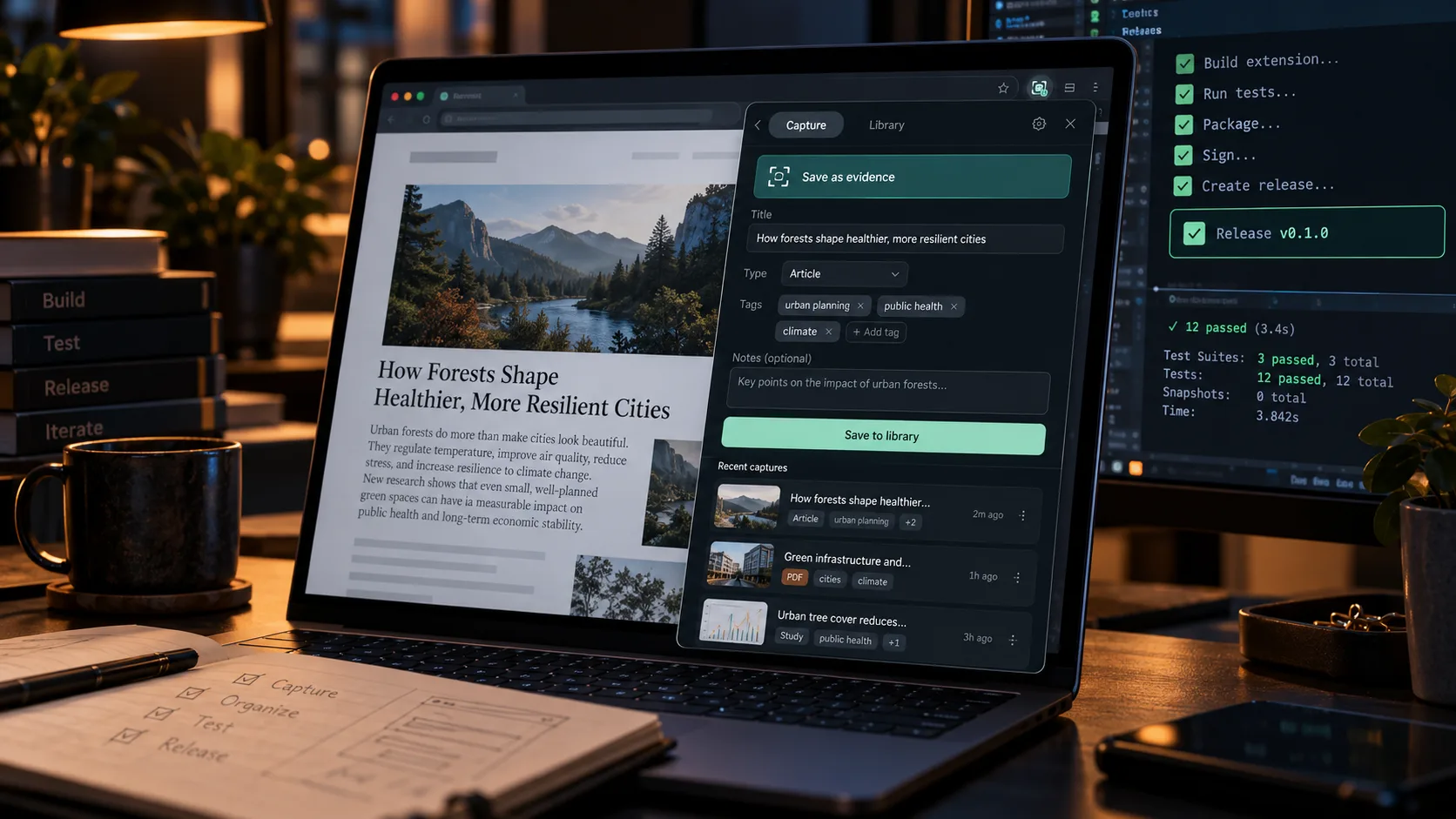
    Darja Rihla already contained research, frameworks, services and experiments. Evidence Capture was different. The Evidence Capture browser extension had to become an installable artifact, behave predictably in a real browser and withstand technical, privacy and platform scrutiny.

    The milestone was not generating code. It was completing the chain from a bounded product decision to an external submission whose status could be stated honestly.

    Evidence Capture browser extension release overview showing the real interface
    Artifact 001 · actual product interface · Microsoft Edge Add-ons · LIVE

    02 · The problem

    Research evidence fragments faster than researchers notice.

    Useful material becomes scattered across tabs, screenshots, bookmarks, notes, copied passages and disconnected documents. Once the source, selection and interpretation separate, later verification becomes slower and less reliable.

    The product question was narrow: could one explicit browser action preserve the active page context, selected text and an optional research note as a portable local record?

    03 · The product decision

    Deliberately small. Local by architecture.

    The answer became a Manifest V3 Chromium extension with no Darja Rihla backend, account, analytics, telemetry, cloud synchronization or AI processing. It reads only the active page after the user invokes it, stores records in local extension storage and exports Markdown or JSON.

    Capability boundary

    Capture page metadata, selected text and a note. Keep at most 500 local records. Fail safely on restricted browser pages. Nothing more was added to make the product appear larger.

    04 · Build

    Building the Evidence Capture browser extension.

    Codex served as the primary implementation agent. The instruction described a finished, testable release: product boundaries, Definition of Done, security constraints, required evidence, packaging and the permission to report an environment block instead of inventing a pass.

    That changed the role of AI-assisted coding. Code generation became one step inside a release contract rather than the definition of completion.

    1. Define the end state.Specify the artifact, constraints and acceptance gates.
    2. Require tests during the build.Evidence is produced with the implementation.
    3. Separate roles.Builder, reviewer and human operator do not collapse into one authority.
    4. Inspect production output.Source inspection alone cannot prove what the shipped bundle contains.

    05 · Verify

    Thirty-four tests were the beginning of proof, not the end.

    The final regression recorded 34 passed and 0 failed. TypeScript strict checks completed without diagnostics, the production build completed, the dependency audit reported zero known vulnerabilities, and the manifest, permissions, privacy claims and release archive were inspected.

    Bundle inspection remained a separate gate. Build tooling can introduce behavior that is not obvious from application source, so claims about network isolation and remote code were checked against the production artifact as well as the source tree.

    06 · Independent review

    Builder ≠ final reviewer.

    A second coding agent, Claude Code, performed an independent read-only release audit. The review re-examined the manifest, data flow, unsafe DOM sinks, storage behavior, hashing contract, exports, build output, package layout and supporting documentation instead of accepting the builder’s summary as proof.

    The human publisher remained the final authority for submission and publication.

    07 · Real browser acceptance

    The artifact had to leave Linux and work in Edge.

    Human acceptance ran in Microsoft Edge on a Windows 11 QEMU/KVM virtual machine. The extension loaded unpacked and was exercised on ordinary HTTPS pages, selected and unselected text, Arabic/RTL content, optional notes, local persistence, Markdown and JSON exports, deletion and restricted edge:// pages.

    The popup console remained free of errors during normal operation and its network inspection showed no unintended extension-originated requests.

    08 · What the test lab taught us

    Product requirements and VM requirements are not the same thing.

    Testing required QEMU/KVM, libvirt, virt-manager, SPICE guest integration, clipboard support, virbr0 networking, a Python standard-library HTTP server, a least-privilege UFW rule and checksum-based artifact transfer.

    Those layers solved the host-to-guest test environment. They are not Evidence Capture product dependencies and would mostly disappear when testing directly in a supported native Edge environment. The distinction matters: infrastructure detours should create reusable operational knowledge without inflating product scope.

    09 · Privacy as engineering

    A privacy sentence had to map back to evidence.

    “Local-first” was tested against permissions, source code, the production bundle and runtime network inspection. The extension requests activeTab, scripting, storage, downloads and clipboardWrite; it requests no host permissions and contains no remote executable code.

    Local-firstSource + bundle + network inspection
    PersistentBrowser restart test
    Exports workActual Markdown and JSON artifacts
    Restricted pages fail safelyedge:// acceptance test

    10 · Integrity without mythology

    SHA-256 verifies the record contract, not external truth.

    Each record receives a deterministic SHA-256 hash over the documented canonical serialization of its fields. Recomputing it can reveal whether that stored or exported record differs from the original canonical input.

    It does not independently prove what a webpage contained at a historical time, establish legal authenticity, create a forensic chain of custody or make the outside world tamper-proof.

    11 · Distribution

    External review became a public release.

    The Edge package was built with its manifest at archive root, checksummed, paired with store copy, permission justifications, privacy disclosures, screenshots and certification notes, and submitted to Microsoft Edge Add-ons.

    Current statusMicrosoft Edge Add-ons · LIVE

    Version 0.1.0 is publicly released. This records publication, not Microsoft endorsement, certification or security approval.

    View on Microsoft Edge Add-ons
    ResearchCaptureEvidenceFindingReport

    12 · What this created

    Not only an extension. A reusable release system.

    Framework 01

    Build → Verify → Prove → Publish

    Create functionality; run structural checks; test the real artifact; submit it to external governance.

    Framework 02

    Claim → Evidence

    Every public statement maps to code, an artifact, a test, an audit or a runtime observation.

    Framework 03

    Four-layer assurance

    Builder → independent reviewer → human acceptance → platform reviewer.

    Framework 04

    Capability → Permission

    Capabilities justify permissions. Permissions do not define or expand product scope.

    Independent development

    Support the next build.

    Evidence Capture started as Artifact 001 and is now a real public release. If you want to support continued development, testing and the next Startup Lab artifacts, you can help fund the work directly.

    Fund future artifacts Support on Buy Me a Coffee

    13 · What comes next

    The first artifact opens the lab; it does not define its limits.

    Future work can extract deeper lessons about browser-extension publication, AI-assisted release discipline and Linux test environments. Those become real articles only after their own research and editorial approval.

    Continue the build series with Build Log 002, Build Log 003, or Build Log 004.